To upload your own logo:
1) First, you must create a logo in Photoshop or your preferred imaging software. Our themes are designed to accommodate flexible logo dimensions, so you may want to experiment with different logo sizes.
2) Once you've created a logo, go to your WordPress dashboard > Theme Options >> Customize Theme > Header, under Header Logo make sure 'Custom Logo' is selected in drop down and then select your logo file from your computer and upload.
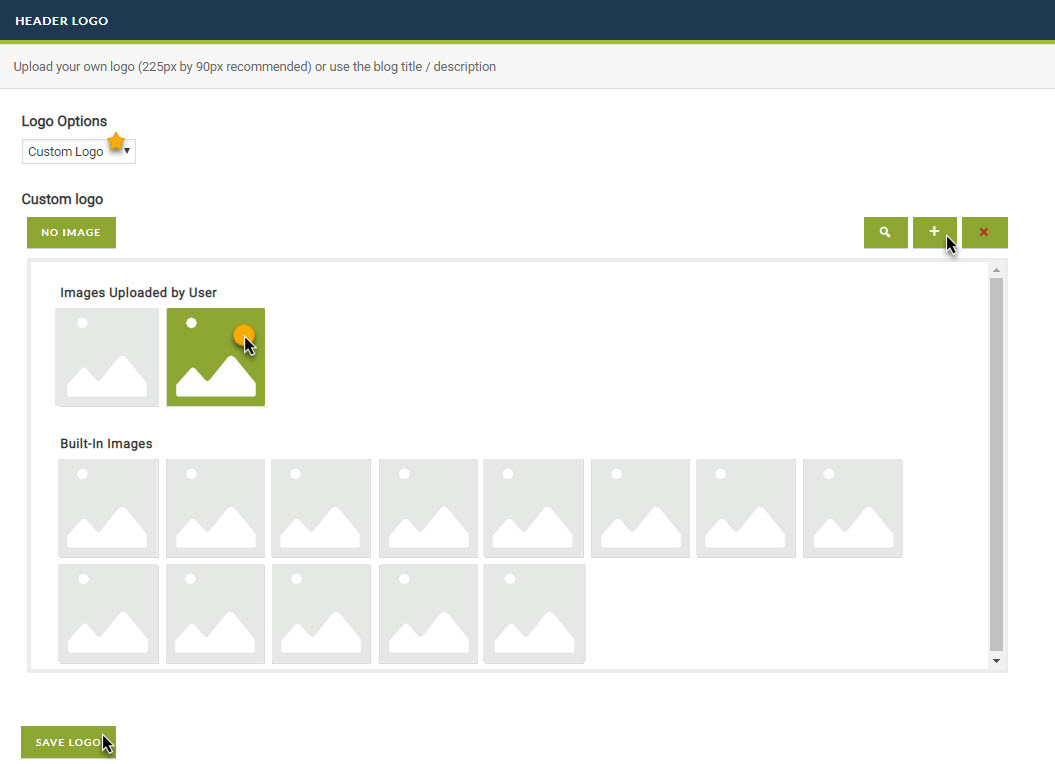
3) Click save, and your logo should now be visible. 🙂
-
No logo? If you do not yet have a logo, you can also insert a simple text logo.
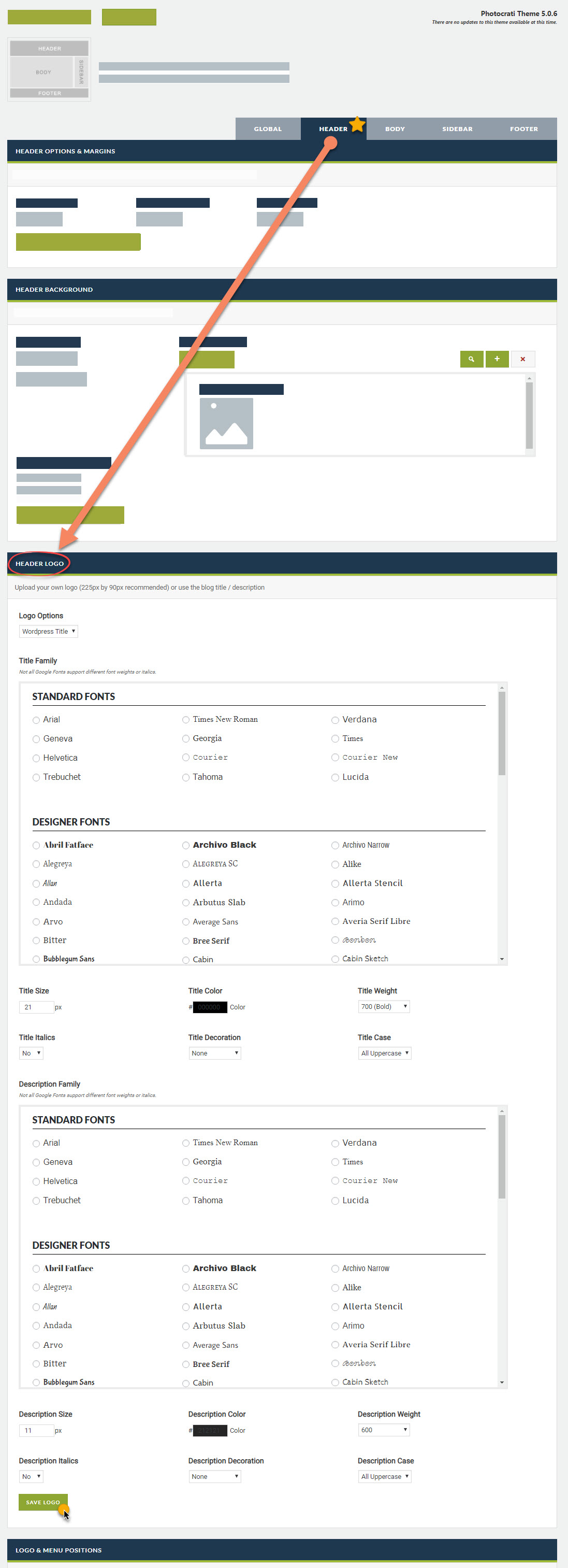
1) Instead of selecting 'Custom Logo' in the dropdown, select 'WordPress Title', customize the text, and save logo. You will now see the title of your site rather than a logo.
2) To change your site's title, go to your WordPress Dashboard >> Settings > General. Type in a title for your site and a tagline and save changes.
becky
28 Mar 2010DOES ANYONE KNOW HOW TO CREATE A LOGO WITH THE SAME KIND OF PRINT/REFLECTION/COLOR AS THE ONE ON THE FRONT THEME PAGE THAT REPLACES THE PHOTOCRATI TEXT?
Arved
18 Apr 2010Hi Becky.
See if this tutorial gives you an idea of how to do it:
http://tutorialblog.org/reflecting-text-images/
Hope this helps!
– Arved
kamini.lecapelain
11 Jun 2010I tried uploading my logo as suggested. It seemed to upload properly and I was able to save the changes but, when I leave the Headers and Footers pages, my logo disappears. I tried several times. Any thoughts?
support
11 Jun 2010Kamini,
May I ask who you are hosted with?
alan.minasi
12 Jun 2010Hi Support,
What is the actual size in pixels that is recommended/I can use for a header graphic? Or does it matter?
The name of my site is 18 characters long.
Thanks,
Alan
support
12 Jun 2010Hello Alan,
It does not matter how large or small, the Header area should adjust to the height of your .jpg .
🙂
jesse
23 Jun 2010the header area will not adjust to the height of my .jpg…Any ideas? I have changed the width of my blog in the Custom CSS section if you think that has something to do with it
support
29 Jun 2010Jesse,
It might. Not knowing exactly what edits you have added, customization gone awry can easily affect several aspects of your site. I would suggest consulting a developer for help in troubleshooting your site if you plan to customize outside of the built in Theme Options.
whitneyleamoore
28 Jul 2010where is the upload logo button? I found where you can download a custom logo, but the download button doesn’t appear anywhere?
whitneyleamoore
28 Jul 2010When I put in “custom logo” there is no option to “select logo” so that I can download the logo.
Do I need to download it in Media?
support
28 Jul 2010Whitney,
You will likely relate to this forum thread: here. If you have any further questions, feel free to add to this forum thread. 🙂
agonybliss
18 Aug 2010When I try to upload my logo I get a http error.
Any idea how I can get passed this…?
support
24 Aug 2010agonybliss,
This is a common issue with flash installed on your computer. You might try suggestions as mentioned in this forum post.
mcsader
2 Sep 2010Hi,
I have the same issue like kamini.lecapelain. I can upload my new header logo and click save. After going to another page and came back to “Header & Footer” alls settings are gone except the Logo & Menu Positions.
After trying a few times I decided to do a clean install of WordPress, but the same thing happens again.
Any idea?
support
3 Sep 2010mcsader,
You might try setting your permissions to 767 on your wp-content directory on your server if it’s already at 755. I would never go as far as 777, that leaves your site completely open and vulnerable to hackers. 767 is close, but safe enough. 755 is best and where it should work at. I might also suggest contacting your server host tech support and ask them if there is anything on their end they could adjust to help your options panel save changes to the MySQL database tables. It may be that you need the latest version of PHP (5). Let us know what you find. 🙂 Also, who are you hosted with?
mcsader
13 Sep 2010Hi,
after lots of playing around with the permissions my website was totaly brocken. So I decided to look around what possibilities I have to get it work. And the only option was to change my hoster. After the move to my new hoster everything looks fine.
Thanks for your help
Regards
Mathias
[email protected]
18 Sep 2010I have uploaded my logo dozens of times, saved it, refreshed my site and . . . nothing. The only thing at the top of the page is “Photocrati. . . ” At one time my logo was fine, then I started to go into the Theme options and now it’s all broken. Please help! Thanks.
support
20 Sep 2010Darlene,
Could you provide the URL to your site, and also the name of who you are hosted with (i.e. ‘GoDaddy’)? Also, please confirm what permissions your WP-Content directory has (i.e. 755), and if you receive any error messages when saving your Theme Option settings.
Thanks! 🙂
maryfriesen
11 Oct 2010I’ve also found that Photocrati has replaced my name in the logo area. How do I fix this?
http://www.maryfriesen.org
I’m hosted by GoDaddy and Word Press
dorothymorrisonphotography
21 Nov 2010I have no trouble putting the logo in, I just have challenges with it finally being in and the right size and everything but there is a slight ghosting image background( a box) behind the logo. I cropped it tightly to the black background and even tried a transparent background but to no avail. What should I do. I do not know word press very well.
Mark
22 Nov 2010dorothymorrison, Can you post your site URL here so we can take a look at the code and image?
Mark – Photocrati Tech Support
info
14 Dec 2010I used the centre position for my header and logo but after uploading my logo it is slightly off centre on all pages. How would i get it centrered?
My page is http://www.neilcuninghame.co.za
Rebecca
15 Dec 2010@info,
Could you provide a URL link to the logo image file so we may try uploading the same image here? Otherwise, please provide the exact width and height of your original logo file so we can duplicate the same. Thanks!
info
15 Dec 2010Hi Rebecca
The size is 1024 x 210
Thanks
Neil
Rebecca
16 Dec 2010Hello Neil,
Thank you for that information. 🙂
The header (#masthead) width is: 960px, so you’ll need to revise and edit your header logo to be no more than 960px. Once you do, everything should appear centered. 🙂
kristinhardwickphotography
28 Dec 2010Hi all,
I am having trouble uploading my logo as well. I can upload it on the Customize Theme page, as a .psd file, but as soon as I click save and then go to view the site, it is not there. I have checked to make sure that my wp content permissions are set to 755. Thoughts? kristinhardwickphoto.com
Thanks!
Mark
29 Dec 2010Kristin, Logos must be a gif a jpg file. PSD files are not recognized by Photocrati or any web server as a useable file format. Mark – Photocrati Tech Support